
Is Fan the Only Option for Laptop Cooling Systems?
 10/08 2026
 437
437
Have you ever found yourself in this situation? You open your laptop in a tranquil library, only to have the fan suddenly roar to life, making your computer the sole source of buzzing noise in an otherwise hushed setting.
Or, when working with your laptop on your lap, the bottom of the device becomes so hot that you can't bear to keep it there, compelling you to constantly adjust your position.
Fans are the conventional solution for laptop cooling, yet they come with three inherent drawbacks: noise, dust buildup, and space occupation.
From ultrabooks to gaming laptops, fans are a ubiquitous presence.
In September 2026, Lenovo unveiled a concept laptop, Project AeroBlade, at the IFA in Berlin. With a 14-inch frame, it measures under 10 millimeters in thickness, weighs less than 830 grams, and is fanless.
01 What Functions Do Fans Serve, and What Issues Do They Bring?
The primary task of laptop cooling is to transfer heat generated by the chip from the interior to the exterior.
The traditional method relies on heat pipes for heat conduction, heat sinks for increasing surface area, and fans for airflow.
The fan's role is to generate airflow, speeding up the dissipation of heat from the cooling fins.
The problem lies in the fact that fans are mechanical components. The rotation of the blades produces noise, with higher speeds resulting in louder noise.
Airflow sucks in dust, which accumulates on the blades and fins, leading to a gradual decline in cooling efficiency. Fans and heat sinks require internal space, limiting the layout options for the battery and motherboard.
The inability to make ultrabooks thinner is largely attributed to the constraints imposed by fans and cooling modules.
02 Replacing Rotating Blades with Vibrating Membranes
The solution adopted by Lenovo's Project AeroBlade is AirJet, developed by Frore Systems. Its core component is not rotating blades but an ultrasonically vibrating MEMS diaphragm.
It operates by having multiple layers of piezoelectric films vibrate at ultrasonic frequencies—hundreds of thousands of times per second—inside a micro-cavity, driven by voltage. This frequency is well beyond the range of human hearing.
The vibration creates suction, drawing air in through the intake. After being heated inside the cavity, the air is expelled at high-speed pulses through the exhaust.
Without rotating parts, bearing wear, or noise from blades slicing through the air, the AirJet Mini Slim module is merely 2.65 millimeters thick, consumes up to 1 watt of power, and can dissipate up to 5.25 watts of heat per module.
Compared to fans, AirJet not only alters the cooling method but also the spatial layout logic of the cooling module.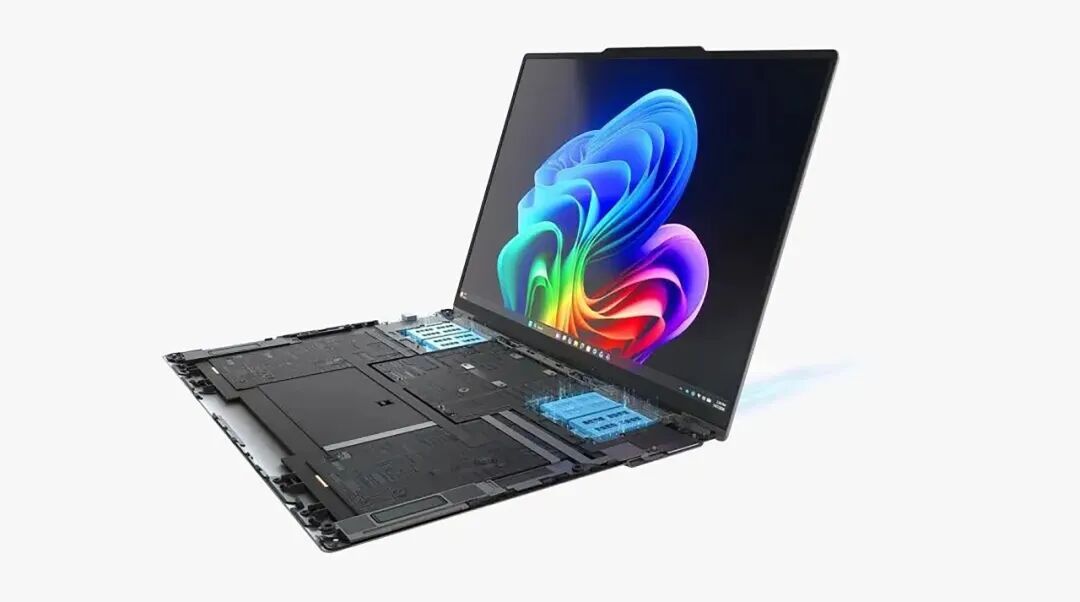
Image source: Internet
While fans require a significant amount of space to accommodate blades and cooling fins, AirJet modules can be distributed across different areas of the chassis, greatly enhancing the layout flexibility for the motherboard, heat sinks, and airflow channels.
Many might inquire at this juncture: Doesn't the MacBook Air already lack a fan?
Yes, but the technical approaches are vastly different. The MacBook Air employs passive cooling, relying on heat sinks and the metal chassis for natural heat dissipation without active airflow.
The trade-off is a limitation on sustained performance, with forced frequency reductions under prolonged high-load tasks.
Tests indicate that when the M5 chip runs long rendering tasks on the MacBook Air, CPU performance can decline by approximately 40%.
Although AeroBlade's AirJet also lacks traditional rotating fan blades, Lenovo defines it as a solid-state active cooling architecture.
The MEMS diaphragm vibrates at ultrasonic frequencies, actively propelling air through the chassis rather than relying on natural convection.
The difference is comparable to opening a window for ventilation versus installing an invisible, bladeless exhaust fan.
03 What Changes Does This Bring?
The most direct impact of this design is breakthroughs in thickness and weight.
The AeroBlade's 14-inch frame measures under 10 millimeters in thickness and weighs less than 830 grams. In contrast, current global 14-inch ultrabooks typically range from 14 to 17 millimeters in thickness and weigh around 1.3 kilograms.
Additionally, noise is eliminated. If you've used a fan-equipped laptop in a quiet environment, you're aware of how disruptive the sudden noise from fan activation can be.
AirJet's vibration frequency is in the ultrasonic range, inaudible to the human ear, with operational noise theoretically significantly lower than traditional fans. Another hidden advantage is dust resistance.
While fans draw in air, they also suck in dust, inevitably degrading cooling performance over time.
AirJet's enclosed cavity structure reduces dust entry points, preventing noticeable declines in cooling performance with use.
Of course, a concept machine is not the same as a mass-produced one.
Lenovo has not yet announced the official release date, price, or full specifications of the AeroBlade.
Whether AirJet can maintain stable performance under sustained high loads and the reliability of multi-module coordination remain to be validated through mass production.
Frore Systems has already collaborated with Intel to integrate AirJet into the Wildcat Lake laptop reference design, indicating that this technology is transitioning from concept to engineering realization.
Fans have dominated laptop cooling for decades due to their affordability, maturity, and effectiveness.
However, when you no longer need to compromise between thickness, weight, and quiet operation, alternative solutions become highly appealing.
#ComputerCooling
-
AI Embarks on a New Phase Amidst Unabated Capital Fervor
-
![]()
Is Fan the Only Option for Laptop Cooling Systems?
-
![]()
What is the role of language in autonomous driving VLA?
-
![]()
Why Does Apple’s Foldable Screen Feel So Uninspired, Even as a Late Entrant?
-
![]()
How Did the iPhone 18 Pro Conceal Face ID Beneath the Screen?
-
![]()
Qualcomm and Huawei Are Becoming Inseparable Partners
-
![]()
Why Are Automakers Embarking on Realignment: Insights from Geely-NIO to FAW-GAC Collaborations?
-
![]()
How Did iPhone 18 Pro Hide Face ID Under the Screen?