ChatGPT Teaches Me Mahjong! OpenAI’s Smart UI Test: Revolutionizing AI Interaction
 10/09 2026
 463
463
Smart UI Transforms the AI Interaction Landscape
For OpenAI, simply refining models is no longer enough. On October 7, OpenAI announced the broader rollout of GPT-6 to all ChatGPT users, while also introducing a new feature, Smart UI, initially available to paying subscribers.
While GPT-6 brings enhancements in reasoning, programming, and other areas, it’s this seemingly “minor” feature that intrigues me most. Nearly four years after ChatGPT’s debut, large models have advanced significantly, yet our ways of interacting with AI have largely stagnated.
The industry has long acknowledged that text-only chatbots fall short as the ultimate solution for AI interaction. Last year, Google experimented with generative UIs on Gemini 3, while Ant Group’s Lingguang aimed to enable AI to instantly create interactive interfaces and applications.
Now, OpenAI has unveiled its unique approach.
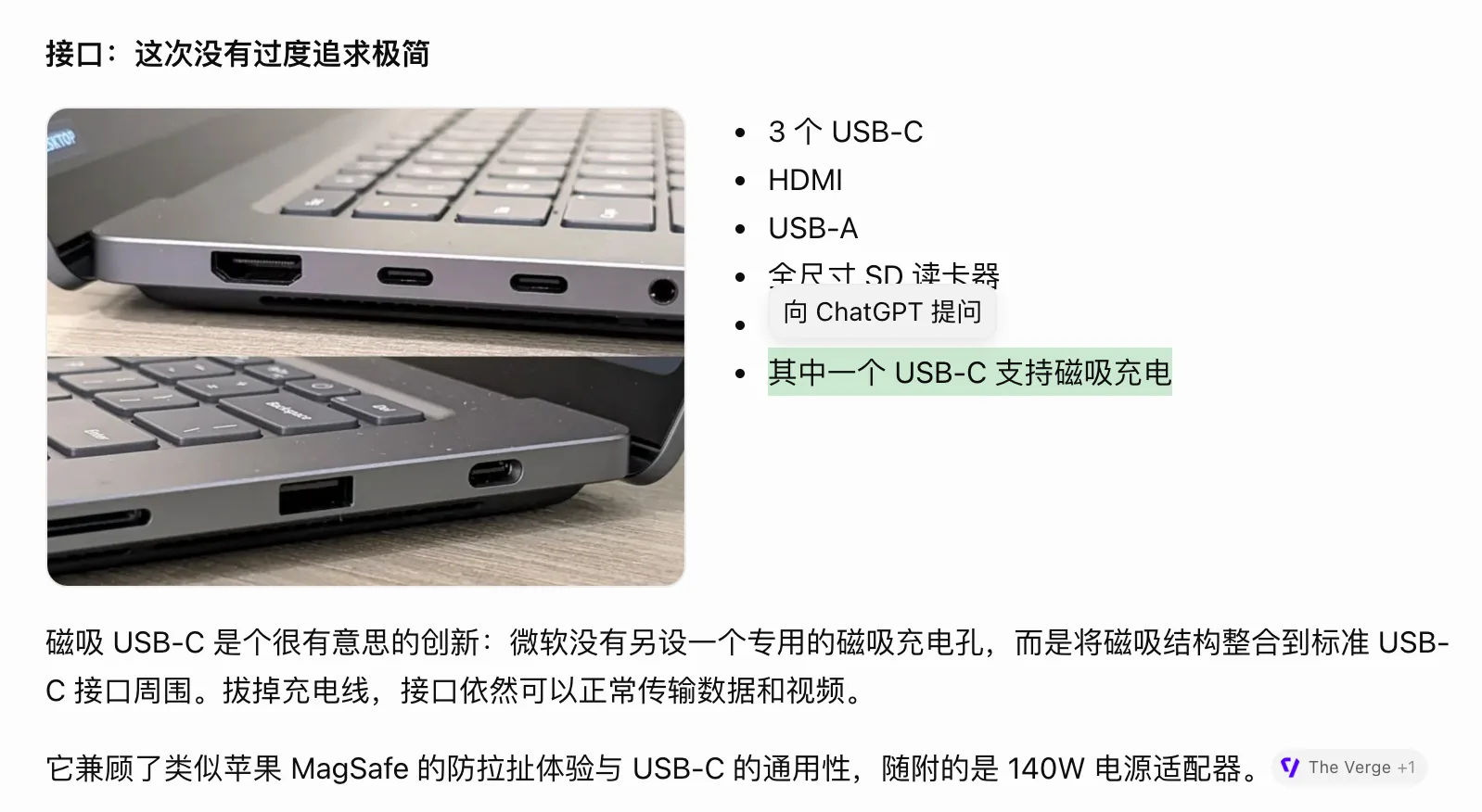
Image Source: Leitech @ChatGPT
In the new ChatGPT, GPT-6 doesn’t just generate content in diverse formats like text, images, or tables based on queries—it also proactively determines the most suitable interface for the user and even creates interactive tools directly within responses. Users don’t need to learn new operational methods or explicitly request interface generation.
While this might seem to merely diversify ChatGPT’s response formats, Leitech’s hands-on experience reveals that the true appeal of Smart UI lies in its interactive capabilities.
AI Teaches Me Mahjong? ChatGPT Lays Out the Tiles
“Teach me Guangdong Mahjong,” I requested simply.
Mastering the basic rules of mahjong is straightforward, but bridging the gap between knowing “four sets plus a pair” and deciding which tile to discard in a live hand is challenging. Relying solely on text explanations forces users to mentally arrange tiles and simulate draws and discards.
ChatGPT began by explaining it would use the Guangdong-style “knocking down the wall” version for instruction. It then introduced the suits—characters, bamboos, and circles—and the honor tiles, complete with illustrations. When explaining winning conditions, it visually displayed four sets and a pair, grouped accordingly.
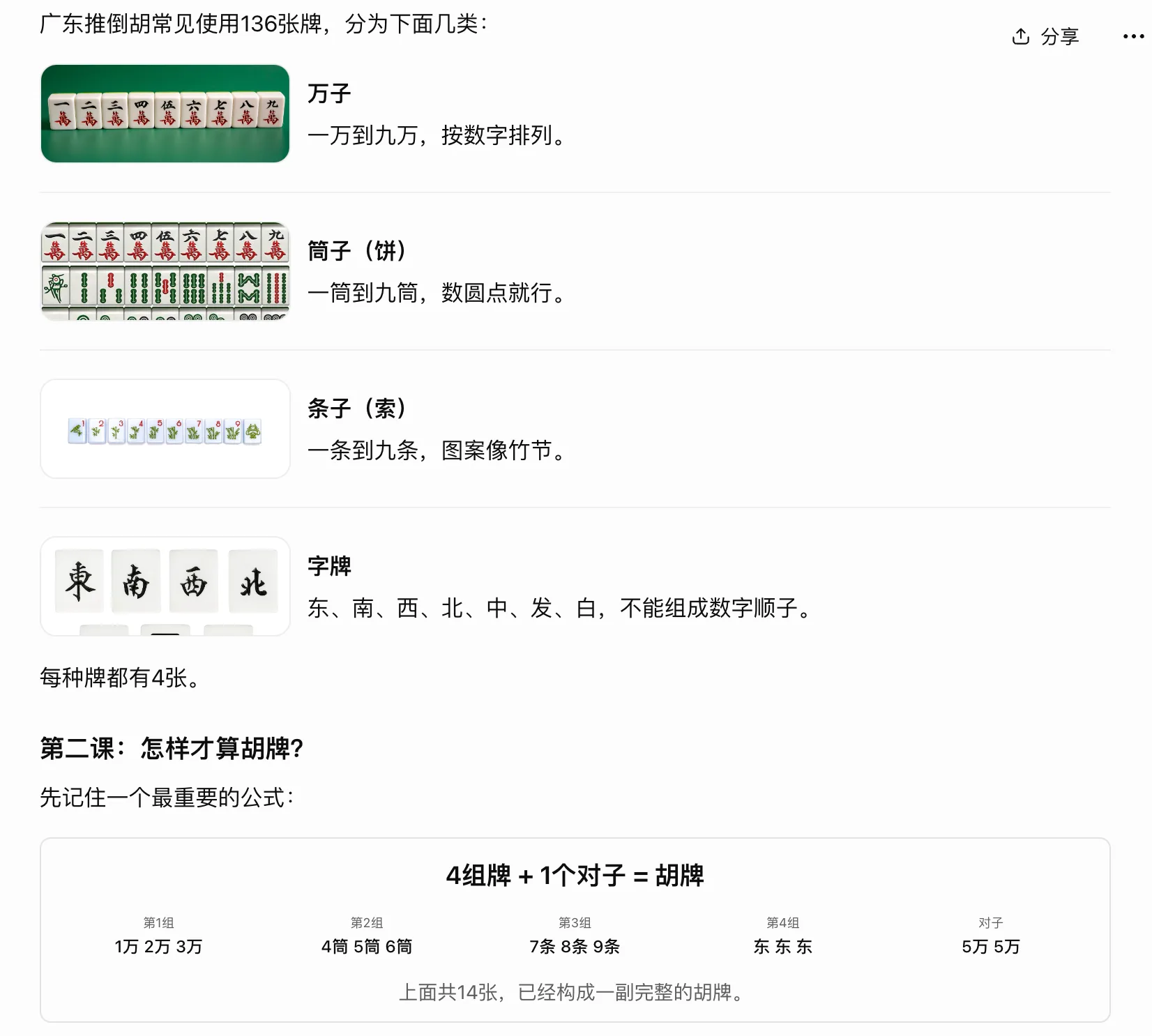
Image Source: Leitech @ChatGPT
During practice, a hand area appeared on the screen, represented by fourteen small squares for the fourteen tiles, along with discard options and a “confirm discard, continue practice” button below.
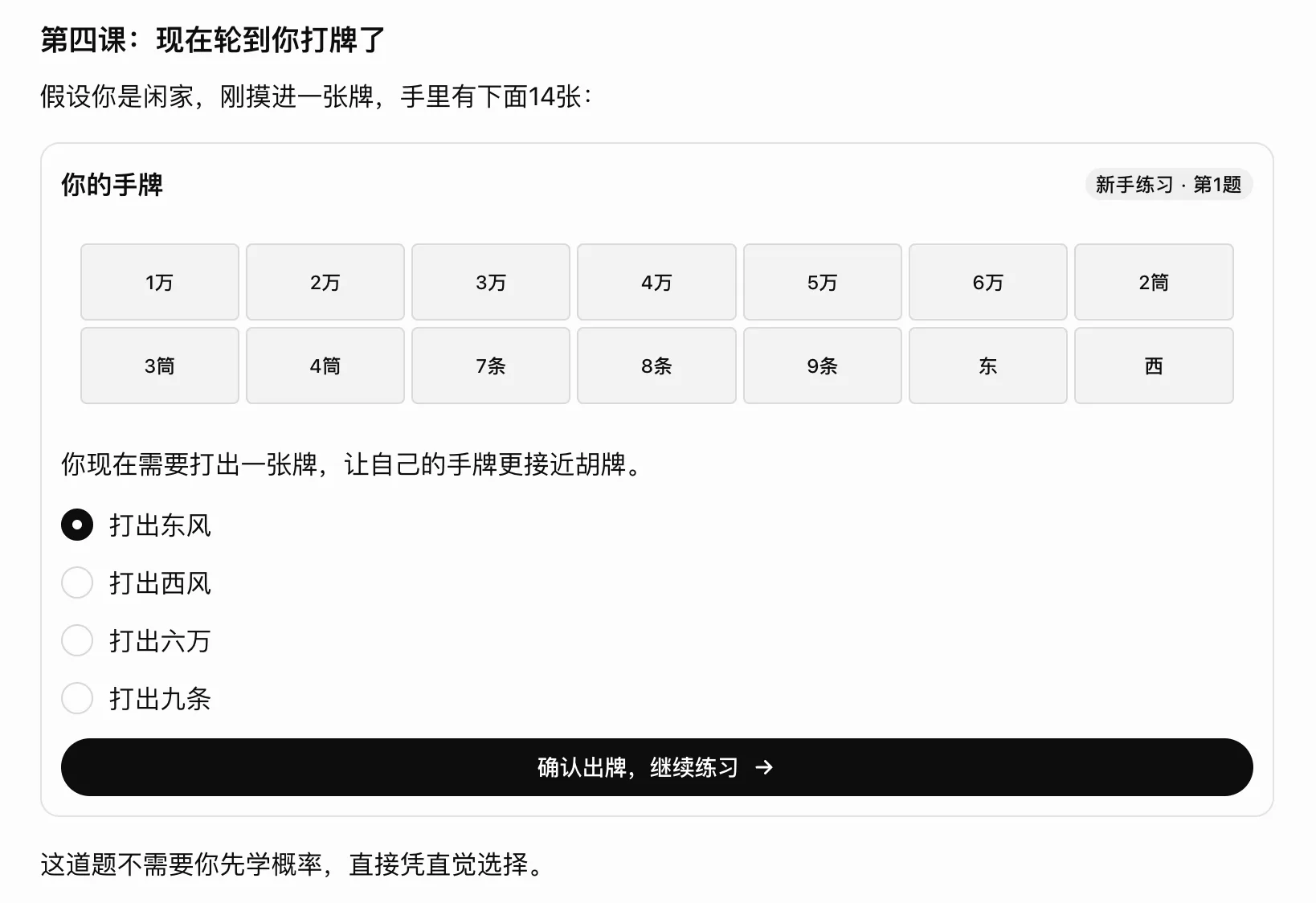
Image Source: Leitech @ChatGPT
There was no mahjong table or animations for shuffling and dealing; tiles were mainly represented by text like “1 character” or “2 bamboo.” Yet, with positions and groupings between tiles, the rules became tangible. I could see which tiles formed sequences, consider the remaining East and West winds, and decide which tile to discard.
In its response, ChatGPT also posed a practice question.
In the first round, I chose to discard the East wind. ChatGPT affirmed my choice but also noted that discarding the West wind would have been equally valid and demonstrated how to form a pair by keeping the West wind. It then dealt me a six of bamboos, highlighting the new tile with a golden border, and asked whether I wanted to continue waiting for the West wind or switch strategies.
To be fair, this presentation and interaction method made it easier for me to follow than explaining all rules, tactics, and probabilities at once. I could immediately apply what I’d learned, and my choices became the basis for subsequent explanations.
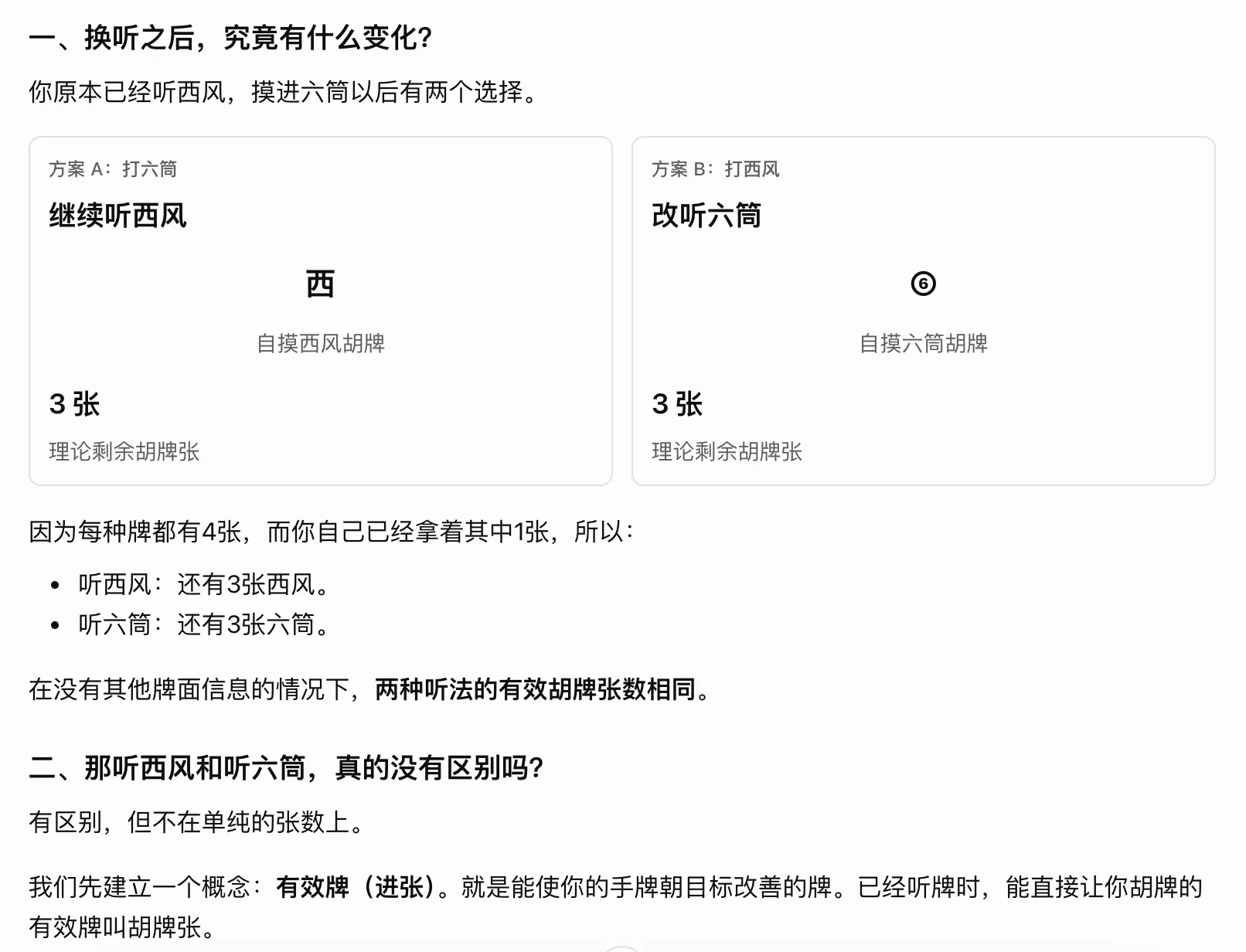
Image Source: Leitech @ChatGPT
Of course, the previous version of ChatGPT could also present multiple-choice questions and simulate mahjong games. The difference now is that options have become clickable controls, and the hand is always visible. I only need to focus on which tile to discard in this step, without redescribing the hand and choices each time.
By the third question, with bamboos forming a sequence of two, three, four, five, and six, I chose to discard the six of bamboos and requested a detailed explanation of the four possible discards. The response immediately listed the choices in a table, then showed how to form winning hands by keeping the two, three, four, and five of bamboos and drawing a two or five of bamboos separately.
Assuming there were sixty unknown tiles, it also used a bar chart to compare the probabilities of winning on the next draw for each choice.
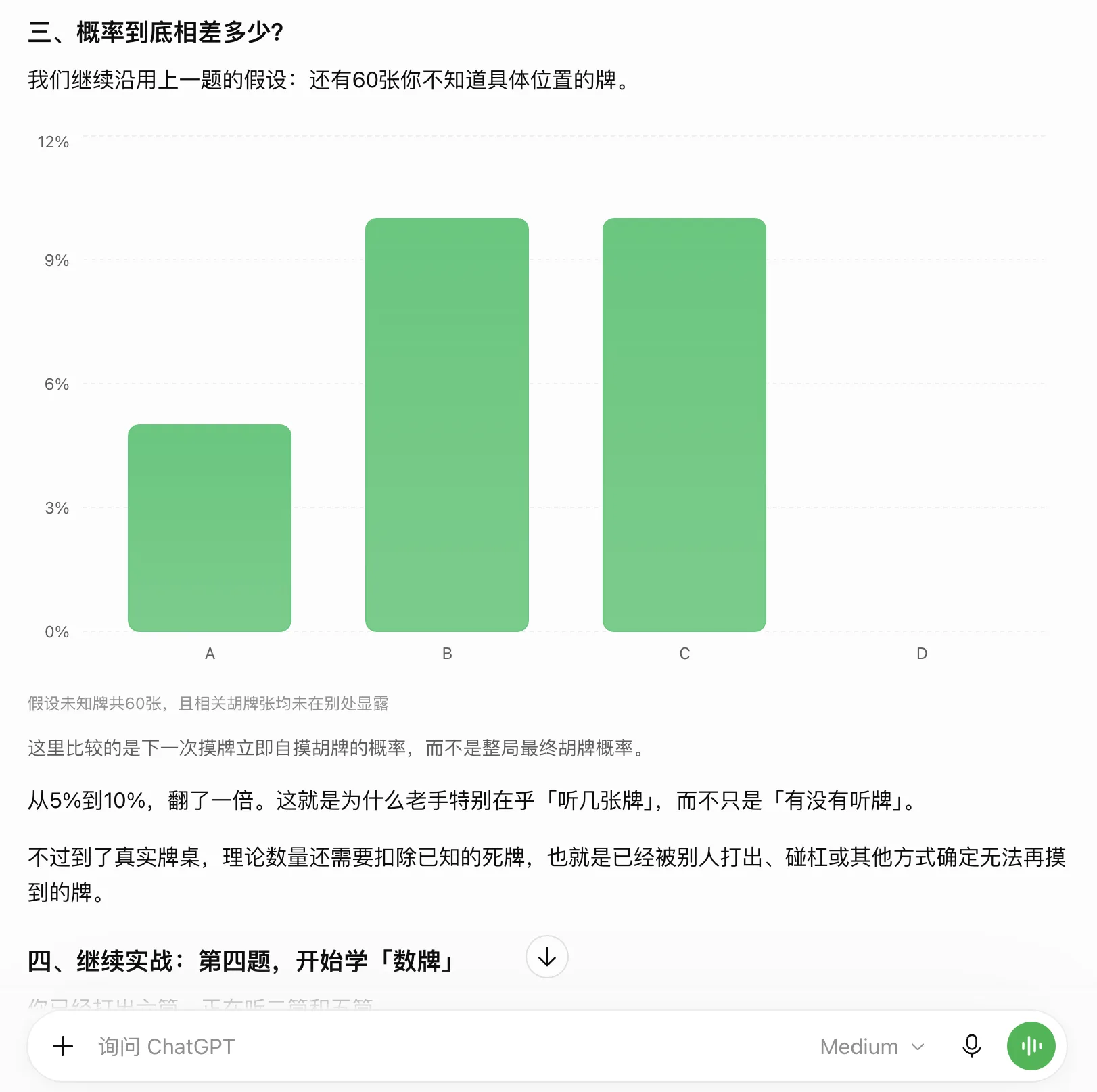
Image Source: Leitech @ChatGPT
Tables facilitate item-by-item comparison, tile groupings help view combinations, and charts reveal differences, eliminating the need to describe all relationships through text. More importantly, the “free” questioning format and clickable options made it easier for me to continue learning, while the chatbox allowed me to interject with new questions at any time, altering subsequent content.
For tasks involving continuous learning and questions, GPT-6’s dialogue based on the smart interface felt natural. It’s easy to imagine how useful this could be for a wider range of learning tasks.
More Intuitive Responses Enhance Understanding
The benefits of the “smart interface” extend beyond learning-oriented dialogues, significantly impacting ChatGPT’s overall conversational experience. In the past, when we asked AI to introduce a product or explain a concept, we typically received a lengthy text response.
However, with GPT-6, when I requested a comprehensive, intuitive, and visual understanding of the Microsoft Surface Laptop Ultra, the response was lengthy but presented different types of information in distinct formats. Product appearance was shown with images, specifications with cards, product comparisons with tables, and the computational architecture with diagrams.
The advantages of specification cards were immediate. Information such as price, processor, memory, and screen size each had designated positions, with large numbers accompanied by explanations, allowing users to quickly locate the details they cared about. This approach preserved the reading order of the main text while offering a faster way to grasp key information.
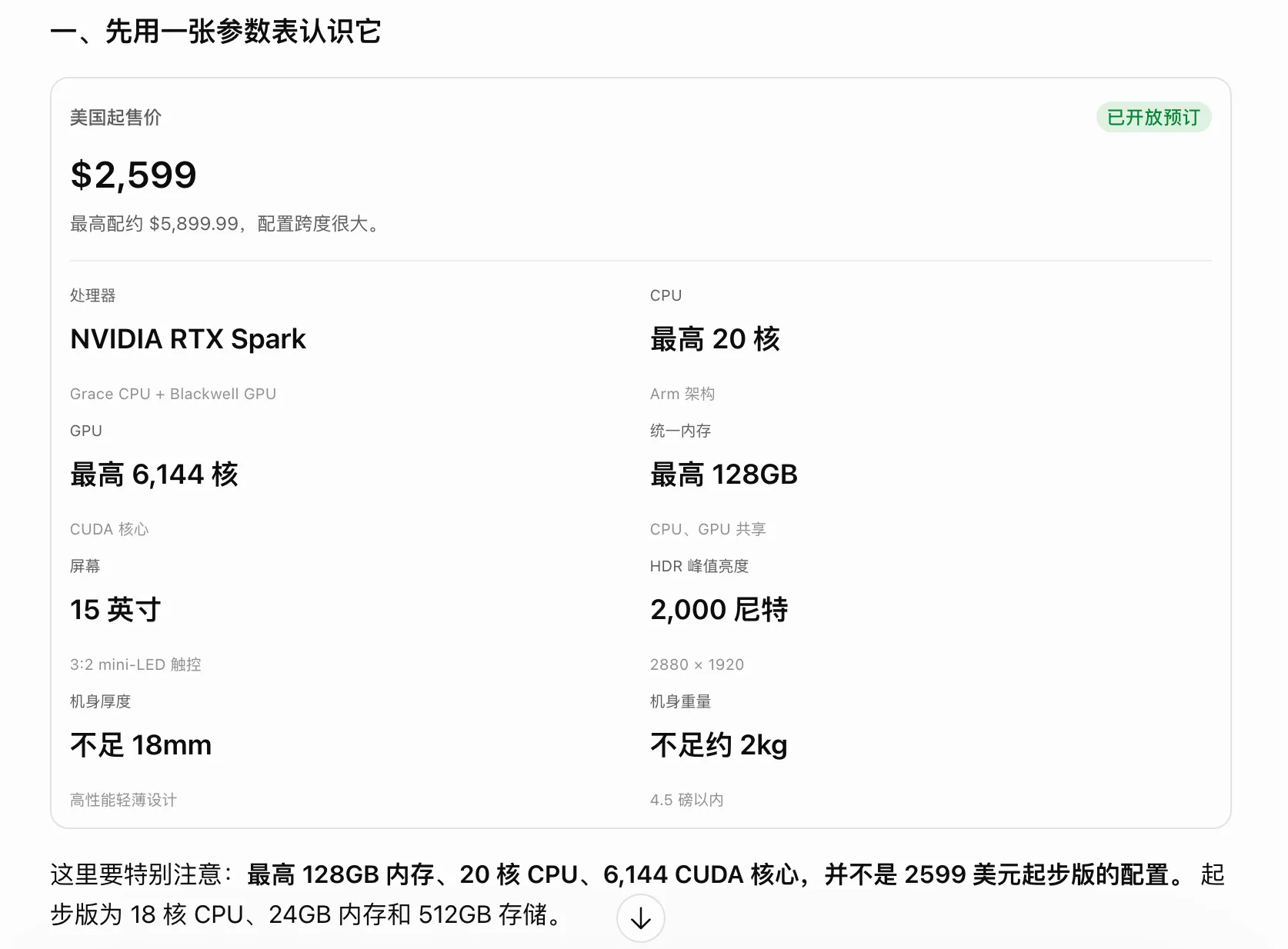
Image Source: Leitech @ChatGPT
Architecture diagrams were even more useful. When explaining the relationships between the RTX Spark CPU, GPU, and memory, the response depicted different computational architectures as boxes and connections, illustrating the differences between independent memory and a shared memory pool. Later, when discussing the relationships between hardware, local and cloud computing, and the agent execution environment, it switched to hierarchical and flow diagrams.
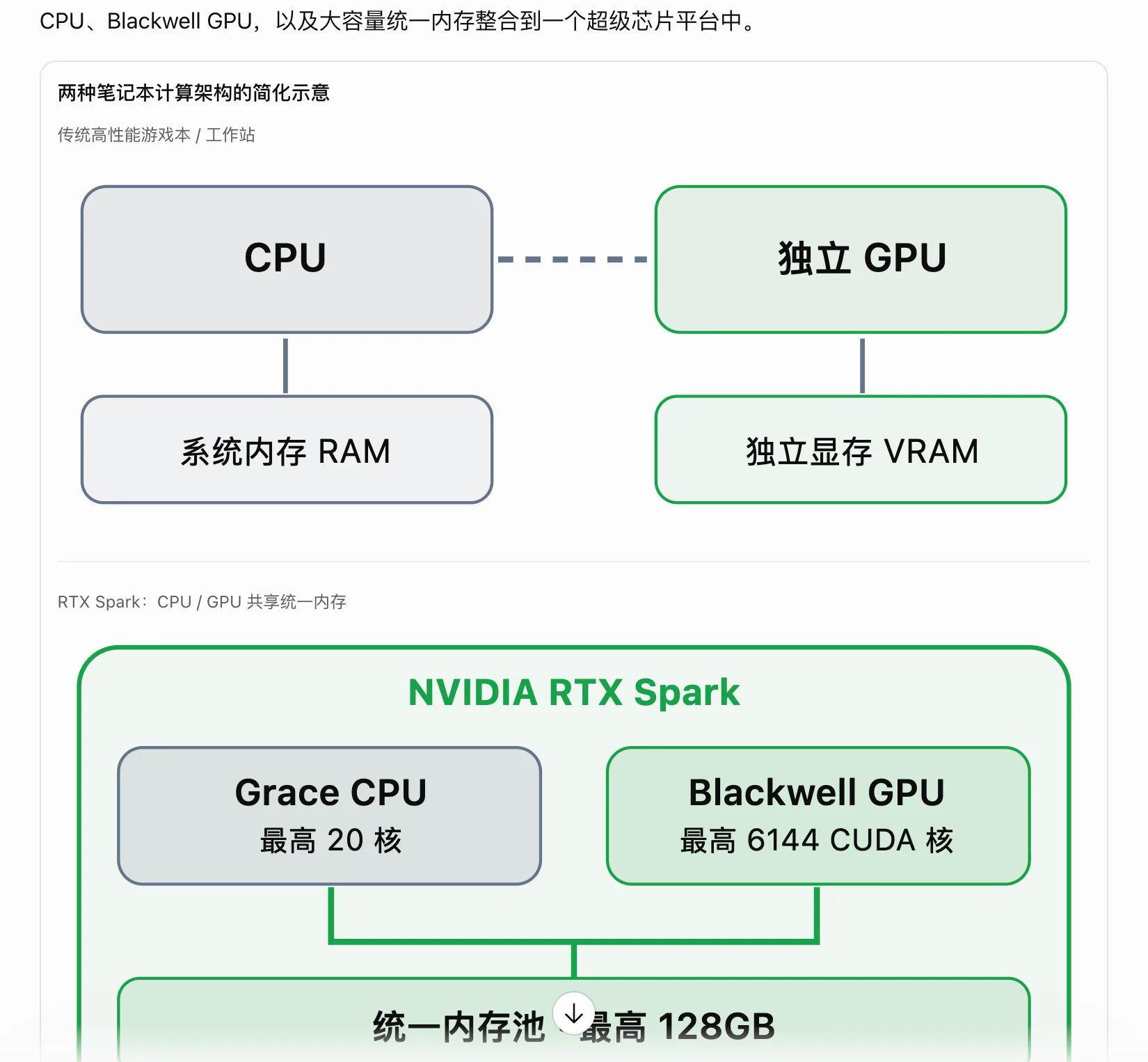
Image Source: Leitech @ChatGPT
When I continued to ask what kind of personal computer Microsoft aimed to redefine, GPT-6 not only provided an opinion but also “summarized” Microsoft's new generation of AI PC through a four-layer relational diagram and visually represented the workflow under Microsoft's Hybrid Intelligence concept with a flowchart.
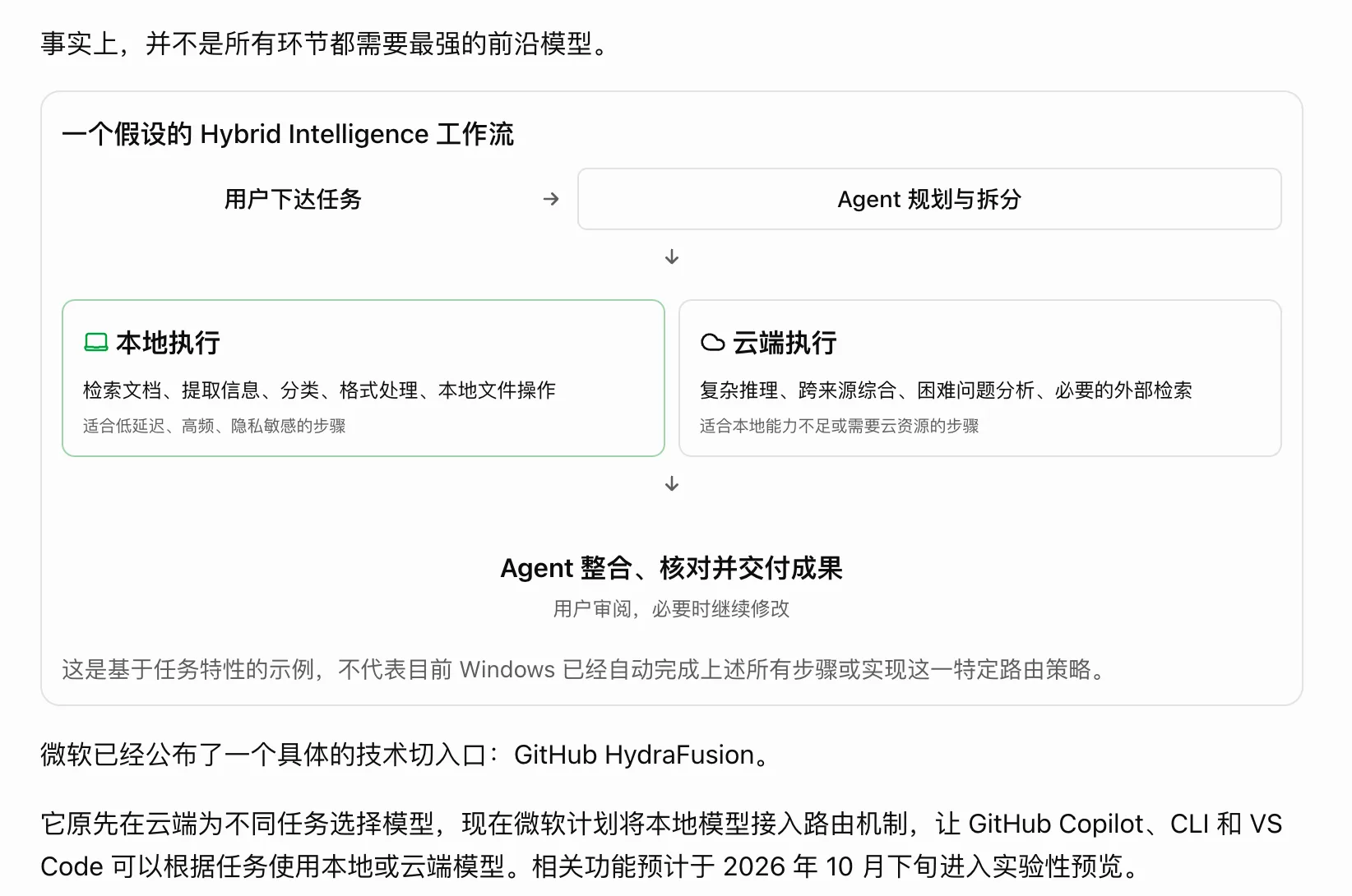
Image Source: Leitech @ChatGPT
While such information could be conveyed through text, the reading threshold and cognitive load would be high, requiring users to remember several concepts and mentally connect them. Diagrams place these relationships directly in front of the user, allowing subsequent text to continue explaining the problems each layer solves and its limitations.
Especially in long responses, these diagrams served as references during reading. If I forgot the position of a concept later on, I could refer back to the diagram without rereading the previous content.
However, text-image layout is only part of the reading experience. For example, when asking how to fold a paper airplane to fly the farthest, GPT-6 would use GPT Images 2.5 to generate step-by-step diagrams. If I further inquired about the principles, it would flexibly present the information through diagrams, formulas, detailed displays, and other means.
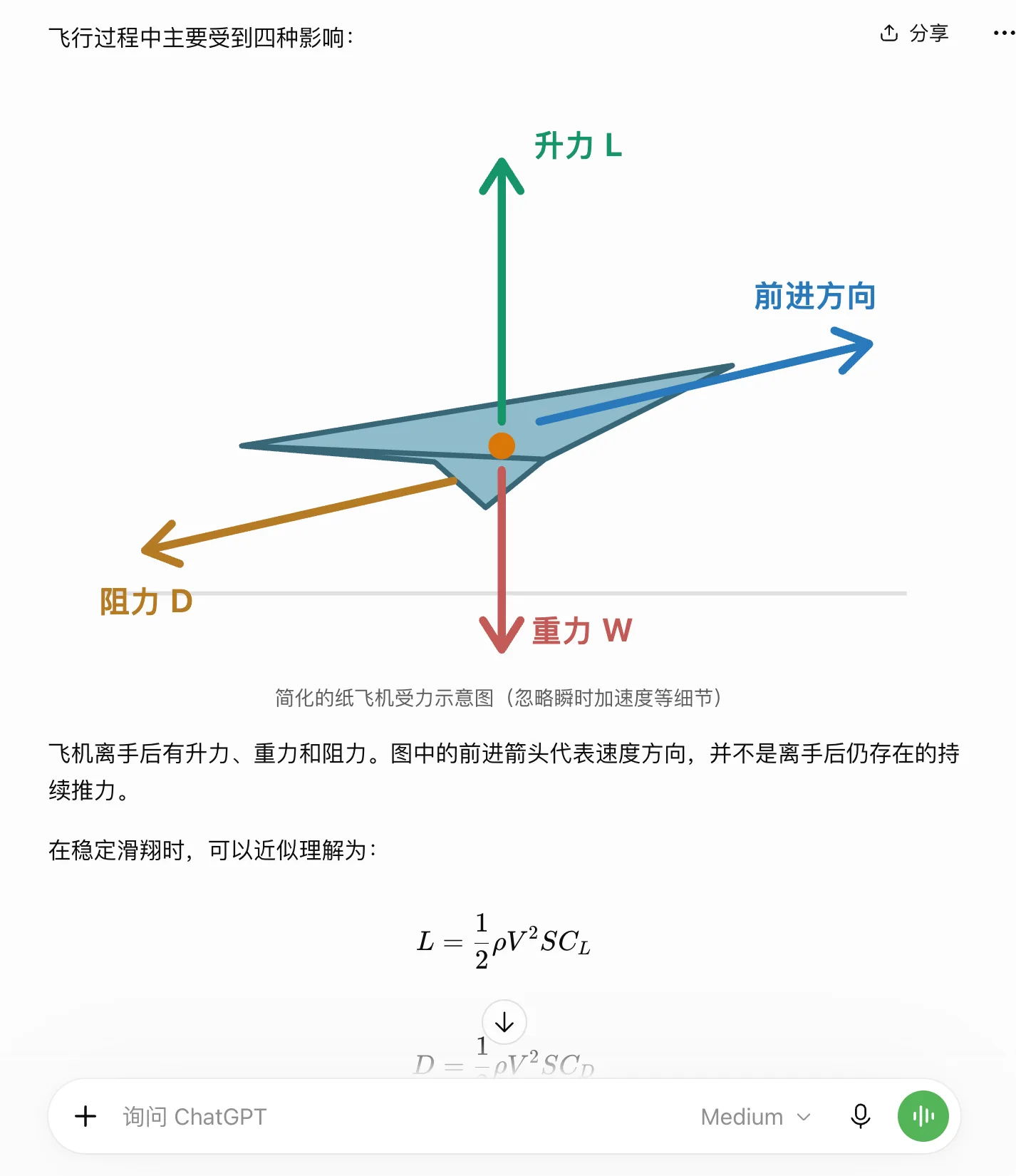
Image Source: Leitech @ChatGPT
This approach not only leverages the full capabilities of the large model but also presents information to users more effectively.
More notably, OpenAI didn’t let the AI “generate everything” but instead prepared a relatively unified set of interface components for the AI.
According to the official introduction, Smart UI uses a native component library, with the interface gradually rendered by a compiler during the model's content generation process. The model's training also includes how to organize content, arrange layouts, and determine when to add interactivity or when text alone suffices.
This presents a different engineering focus compared to Google’s publicly researched method of generating HTML, CSS, and JavaScript to build customized pages. While freely writing pages offers greater design flexibility, using unified components makes it easier to preserve familiar buttons, forms, and reading habits.
From today’s perspective, Smart UI’s approach is actually more worth emulating.
Will Smart UI Become the New Standard for AI Interaction?
Last year, Google demonstrated its exploration of generative interfaces (Generative UI) in Gemini 3.0. Faced with different questions, Gemini was no longer limited to text and images but could directly generate web pages with interactive functions, even allowing users to understand knowledge and solve problems through interface operations.
Ant Group’s Lingguang also took a bold approach in China. Users could simply propose their needs in natural language, and Lingguang would generate various interactive mini-tools, ranging from travel planning and data calculations to mini-games, without requiring users to know programming or search for specialized apps.
These explorations point in the same direction: Since AI can already understand user intentions, why should users adapt to pre-designed software interfaces instead of having AI generate interfaces based on demand?
However, generating a usable mini-tool and allowing users to stably and naturally use these tools in daily conversations are two different matters. Especially for general-purpose AI assistants like ChatGPT and Gemini, which cover a wide range of tasks, users may not always need a completely new interface, nor do they want to relearn an operational logic with each question.
This is why I believe Smart UI is more worth emulating.
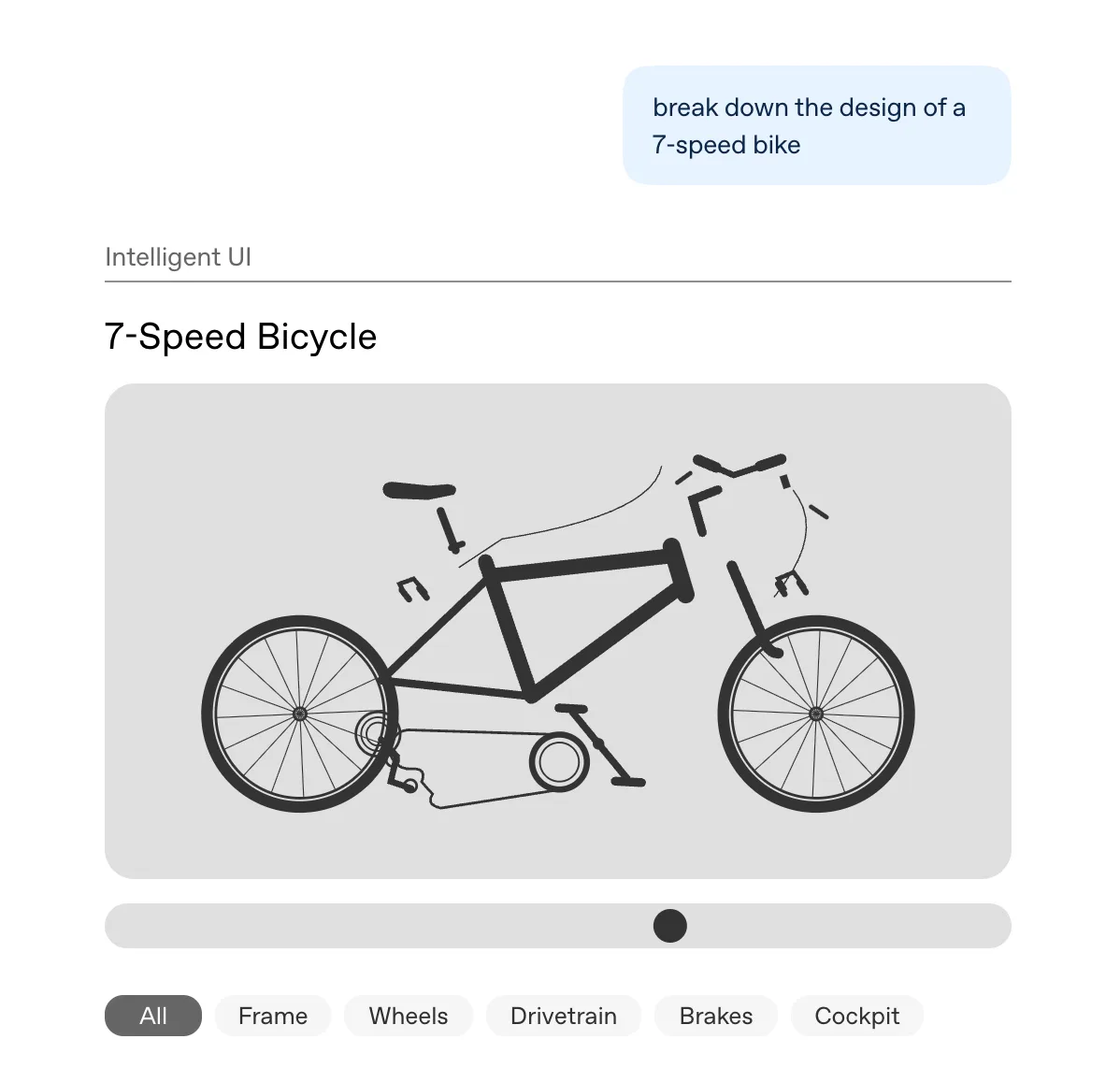
Image Source: OpenAI
Instead of blindly pursuing freedom in interface generation, OpenAI first established a unified set of components and interaction rules, then let GPT-6 decide when to use them and how to combine them. While it can still generate specialized interactive content when needed, more often, it simply adds an image, a set of cards, or a few clickable options to the original response.
While this may not seem as impressive as directly generating a complete web page, it better aligns with how users interact with AI daily.
Returning to the mahjong teaching example, I didn’t need ChatGPT to develop a mahjong game for me; I only needed it to display the hand while explaining the rules, provide discard buttons during practice, and show probabilities when comparing different discards. Similarly, for understanding the Surface Laptop Ultra, there was no need to generate a complete product website; simply placing images, specifications, and architecture diagrams in appropriate positions improved the reading experience.
A good interface doesn’t lie in how much it generates but in whether it reduces the cost of user understanding and operation.
More importantly, this approach is easier to integrate into today’s AI products.
Especially as agents increasingly perform tasks on behalf of users, it doesn’t mean users no longer need to participate. On the contrary, when AI begins to help us search for information, compare options, and even operate other software, users still need to understand what it has done, why it did so, and how to adjust and confirm the next steps.
An interactive interface that can change according to the task is clearly more useful than having AI simply output text responses.

Image Source: OpenAI
Of course, Smart UI is still far from solving all problems. Whether the dynamically generated interactions can remain stable over the long term requires more practical use to verify. Not to mention, it still has a long way to go before truly replacing complex software applications.
Source: Leikeji
Pictures in this article are from the 123RF royalty-free library. Source: Leikeji
-
![]()
Chery’s Globalization 3.0: What Exactly Does It Entail?
-
![]()
Why Does Apple Opt for Aluminum in Its Phone Cases? Beyond Lightness and Heat Dissipation
-
![]()
Why Is the Time Allotted for Driver Takeover More Critical When the Intelligent Driving System Disengages?
-
![]()
Capturing the Victoria Harbour Fireworks with iPhone 18 Pro Max: A Glimpse into Apple's New Imaging Philosophy
-
![]()
Final Ruling: Domestic Auto Market Fails to Capitalize on Traditional 'Golden September' as Sluggishness Persists
-
![]()
Globalization 3.0: Zhang Guibing Faces His Ultimate Challenge
-
![]()
ChatGPT Teaches Me Mahjong! OpenAI’s Smart UI Test: Revolutionizing AI Interaction
-
![]()
Doubao Powers Up! Seres Unveils New AIVA Car—Is the RMB200,000 Market Set for a Shake-Up?