“After Testing K3.1 Pro Overnight, It Seems Kimi Is Truly Advancing Towards Embodied AI”, “K3.1 Pro, Speed, Task Execution, Allowance, Embodied AI”
 10/26 2026
 558
558
When the K3 model first made its debut, evaluating its speed was quite challenging. However, during this recent test, everything proceeded with remarkable smoothness. Although it doesn't quite match the performance of various top-tier models, its thinking speed is undoubtedly above average.
Not long ago, many people believed that without knowledge distillation, domestic large models wouldn't bother releasing a Pro version. Well, Kimi has just proven them wrong.
01 Speed and thinking ability are starting to converge
This time, I didn't even need to switch to high-speed mode; the standard Pro version's speed was already satisfactory. Kimi has also introduced a Pro Highspeed variant, which, according to official claims, delivers the same results as the standard Pro but with a model output speed approximately 2-3 times faster.
However, this speed increase isn't as significant as the jump from K3 to K3.1. The official hasn't provided a detailed explanation of the reasoning adjustments made to the standard Pro to achieve this speed boost. The technical blog focuses more on the training process: Kimi has increased its post-training investment, subjecting the model to joint reinforcement learning across hundreds of downstream domains. It has also improved long-context processing and task execution environments.
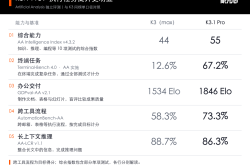
In rankings, the task execution score has seen the most notable improvement. According to the comprehensive index published by the independent evaluation agency Artificial Analysis, the K3.1 Pro rose from 44 points in the K3 version to 55 points, ranking fourth. In the Terminal-Bench 4.0 terminal task test, its score jumped from 12.6% to 67.2%, ranking first in the published results. This test requires the model to complete tasks in a computer terminal, with success only achieved by passing all checks.
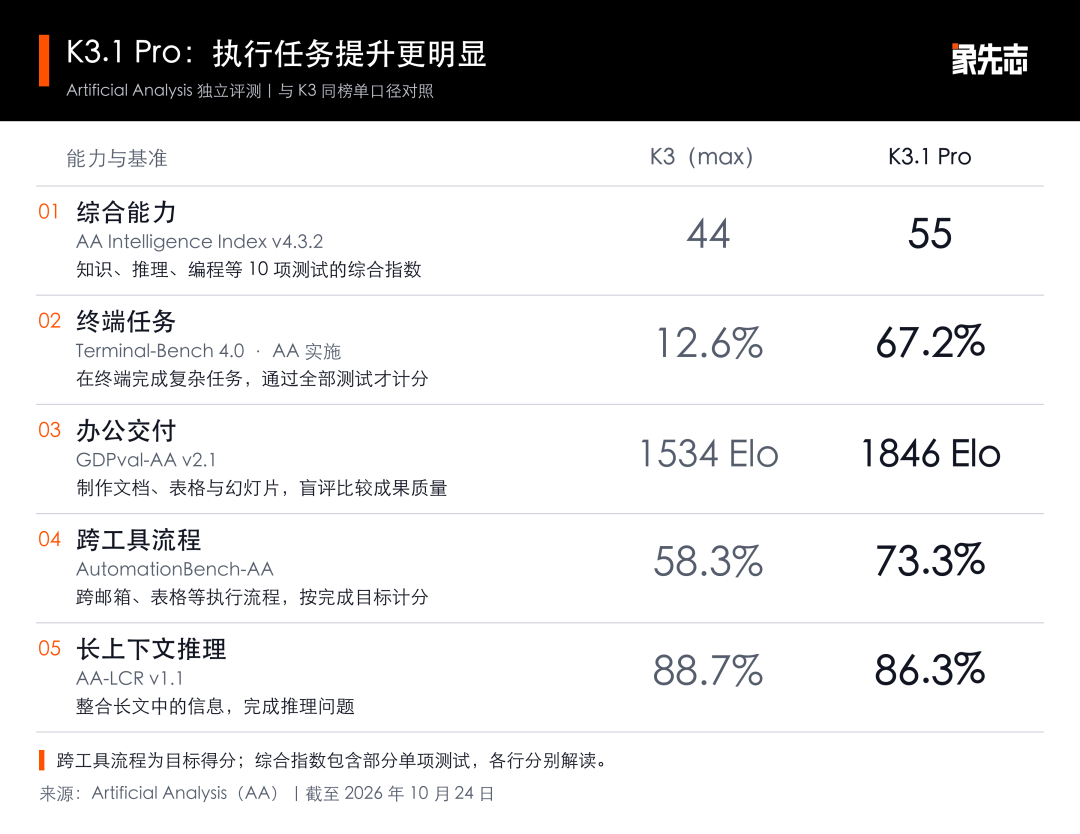
In independent evaluations, task execution has shown noticeable progress, while long-context reasoning has slightly declined.
For users without a technical background, the two office-related scores are more pertinent. GDPval-AA compares the quality of documents, spreadsheets, and presentations created by the model, with the K3.1 Pro ranking third. AutomationBench-AA tests the ability to complete tasks across email, spreadsheets, and customer management systems, with the Pro's target completion score rising from 58.3% to 73.3%.
In Kimi's published results, the Pro also achieved two leading scores: 51.7% in the long-task programming test SWE-Marathon v1.1, higher than Opus 5.5's 46.3%; and 64.4% in the financial document Q&A OfficeQA Pro v2, higher than Opus's 62.2%. Both ranked first among the models listed in the table. Here, the Pro's scores were self-tested by Kimi, while the competitors' scores were partly sourced from external rankings.
The progress isn't uniform. In the official HLE full-scale difficult problem test, the Pro using tools scored 70.0%, higher than Opus 5.5; without tools, it only scored 51.1%, lower than Opus's 59.8%. In AA's long-context reasoning test, the K3 (Max) originally had 88.7%, while the Pro had 86.3%.
The official human walking demonstration is more intuitive: a virtual human initially kept falling but, after several rounds of training, gradually learned to walk continuously. The K3.1 Pro programmed the simulator, arranged training and evaluation, and then modified the approach based on the experimental results. Throughout the process, the arm movements were never ideal, and adjusting rewards didn't solve the issue; the model then inspected the simulator, fixed 36 calculation errors in the shoulder muscle force arms, and retrained the controller.
In the official demonstration, the virtual human goes from falling to learning continuous walking.
Human movements are generated by simulation and control strategies, with Kimi responsible for continuing to improve training based on the results. It didn't stop at adjusting rewards but also found errors in the simulator, which interests me more than how human-like the final walk was.
For such long tasks, the number of calls naturally increases. This time, Kimi has reduced the API output price for the standard Pro: for every million output tokens, the K3 costs 100 yuan, the Pro costs 68 yuan, and the Highspeed costs 136 yuan. Tokens are the unit used by the platform to calculate text and code usage, with monthly subscribers still using their package allowances.
The high-speed version of Kimi Code also consumes about twice the allowance, and the speed increase only occurs during the model output phase. Reading and writing files, executing commands, and running programs still take the original amount of time. When the standard Pro is already fast enough, I'll save the allowance for later revisions.
02 The speed has increased, but the allowance may not be enough
Some users find the standard Pro fast enough. One user posted a call record reaching 111 tokens per second, stating that the standard version is sufficient without needing the high-speed version.
Chetaslua, who gained early access from Kimi, released a web demonstration, stating it was generated in one go by the model and providing a CodePen link for readers to view directly.
Some users also encountered allowance issues during repeated revisions.
LanceYang provided the model with five reference images to create an interactive 3D game controller. After the first version and two more rounds of revisions, the component shapes and spatial relationships were still incorrect, and the model hit usage limits when verifying the modifications. He was using the 199 yuan package and had already used up part of the allowance before starting on the controller.
In the well-known pelican riding a bike test, two users in another post reported very different consumptions. One user, on the 199 yuan package, selected the high-speed version and the highest thinking tier, and after generating, asked for "further optimization," nearly exhausting the rolling allowance. Sanyeg, on the 599 yuan package with the same model tier, said a pelican task only consumed about 6%. With different packages, tasks, and revision processes, it's hard to judge which is more cost-effective based solely on the percentage. So, overall, token consumption is slightly confusing right now.
According to Kimi's rules, all features share a monthly allowance, with model, context, and tool calls all affecting consumption. Code also has a separate rolling usage limit. Whether a user can successfully complete a work depends on the total usage from generation to revision.
03 There are minor bugs in scenarios, but they can self-repair
I selected seven programming tasks, starting a new session for each, allowing Kimi to run, check, and modify on its own, and then reviewing the first delivery after completion. We didn't modify the code for it. Images, GIFs, and excerpts of prompts are provided below, with the complete prompts and input materials attached in the release package.
“Pelican riding a bike” has been tested too much, fearing test bank optimization. So we chose: let the bike ride the pelican.
Actual prompt (excerpt): Two equally sized stages play simultaneously on the left and right, with the left showing "pelican riding a bike" and the right showing "bike riding a pelican."... The bike is supported by the pelican's back, with both wheels off the ground, and the pelican's legs alternate steps to move forward.
The bike is above the pelican but not resting on its back.
Kimi created a side-by-side comparison: on the left, the pelican pedals the bike; on the right, the pelican walks with the bike hovering above it. The positions are reversed, but there's a gap between the bike and the pelican's back, making it unclear that the pelican is supporting the bike. This should be due to a logical connection issue between the pelican and the bike's preceding nodes, causing the subsequent suspension. Another minor issue is that the bike's wheels keep spinning, which is logically problematic but can be optimized.
The physics task performed better. We set up a scenario with a ball colliding inside a rotating heptagon to observe the actual collision and movement patterns, and the results were quite good.
Actual prompt (excerpt): The circumradius of a regular heptagon is 320, rotating clockwise at 0.2 radians/second. Inside, place 20 balls with a radius of 12, numbered 1 to 20, initially non-overlapping, subject to gravity of 500 pixels/second downward;... Wall rebounds must consider the local velocity of the rotating wall.
The balls rotate with the frame, are lifted up, and then roll back to the bottom.
By continuously running the simulation and checking the ball positions, no wall penetration or ball loss was found. It also factored in the wall's movement speed during rebounds. The initial draft of this task could already be used to demonstrate gravity and collisions.
For the sound analysis task, I swapped in low and high-pitched audio files to check if the spectrum truly reflected the input.
Actual prompt (excerpt): Analyze the actually playing sound using the Web Audio API, displaying the spectrum, RMS loudness, and dominant frequency in Hz; the frequency axis should range from at least 0 to 4000Hz, using interpretable real data and prohibiting pre-programmed rhythm animations. The volume slider affects the output and analysis results.... F05-demo.wav is provided for development, but the program must support other audio files in the same format.
With new audio, the spectrum and readings still match.
After swapping in low and high-pitched files, the chart and frequency readings matched. Halving the volume nearly halved the measured amplitude; muting set the amplitude to zero, and the dominant frequency value disappeared.
However, short sounds linger on the chart for a moment before disappearing. It's sufficient for observing sound pitch and volume, but to make the visuals closely follow the rhythm, adjustments are needed.
Pixel Runner is only 12×8 pixels, using four frames to depict running.
Actual prompt (excerpt): Draw a colorful road, starry sky, and a 12×8-pixel runner using up to 32 fixed RGB colors. The runner should have a recognizable four-frame running cycle, maintaining a logical size of 12×8; the road should scroll left, with the character staying at the horizontal center of the screen.
Four poses combine to depict running, maintaining a pixelated style.
The size, color count, and action frame count all met the requirements. The character's arms and legs alternate swinging, and the colorful road scrolls backward. Despite the simplicity, the running action is recognizable.
Another task involved continuously transforming the same card into various controls like buttons and players.
Actual prompt (excerpt): The same card shell at the center of the screen should transform sequentially into a button, loader, success checkmark, player, volume control, switch, bar chart, and hint bar within 16 seconds, then return to a button.... Use continuous transformations of shape, rounded corners, size, icons, and text to represent states, not just full-page switches.
The same card transforms between a button, player, and other controls.
Most transformations were smooth, but there was an issue at the end: the hint text disappeared first, leaving a blank button on the screen. At the start of the next cycle, the button's text suddenly appeared. This is easy to miss in screenshots but noticeable in continuous playback.
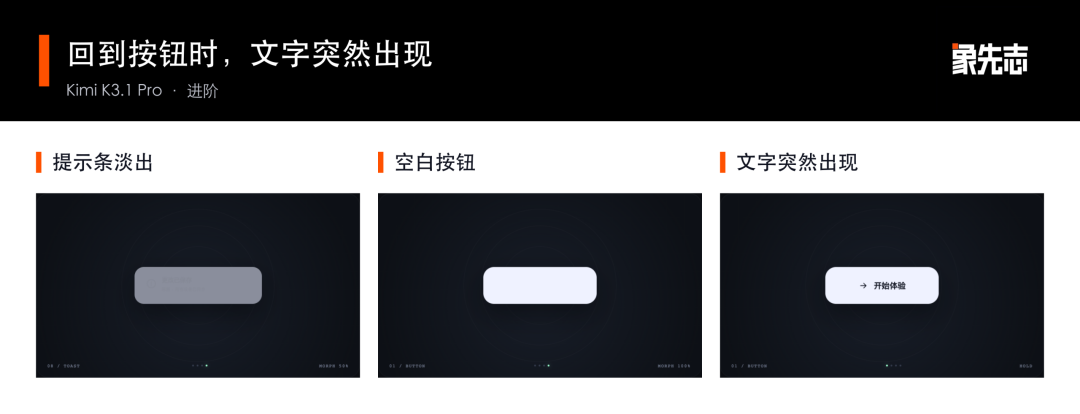
When returning to the button, the text suddenly appears.
In evaluating 3D modeling capabilities, we chose the case of Along the River During the Qingming Festival and specifically requested that the characters and boats move. When crossing the bridge, the height should follow the bridge's surface; porters should pick up goods first, then walk to the dock to put them down. Only by zooming in can you see if the actions and scenery are well-coordinated.
Actual prompt (excerpt): Please create a freely roamable 3D scene of Along the River During the Qingming Festival in a browser, focusing on the Bian River, wooden arch bridge, bridgehead market, riverside shops, and distant city gates.... Characters should have recognizable body and limb movements, continuously performing different activities, including at least walking along the street, crossing the bridge, trading at stalls, and carrying goods at the dock; boats should sail along the river, with characters on board moving with the boat.... Pedestrians should move along walkable paths, docks, and bridge surfaces, with their feet touching the current ground or bridge height, not walking into the river, buildings, stalls, or through railings.
The arched bridge, street market, and dock are all rendered as viewable 3D scenes.
During creation, I saw the character floating and people walking into the river or through shops. These issues initially occurred but were then self-optimized by Kimi.
Kimi began gradually adjusting on its own, fixing issues like objects clipping through surfaces and characters walking through the river. We didn't add extra prompts for these basic logical issues, and it also corrected the characters' heights and adjusted their walking routes through shops.
Most impressively, the shadow calculations were highly accurate, clearly showing that the model has started to understand the real laws of the physical world.
These modifications occurred during Kimi's self-inspection process, without us adding any revision prompts.
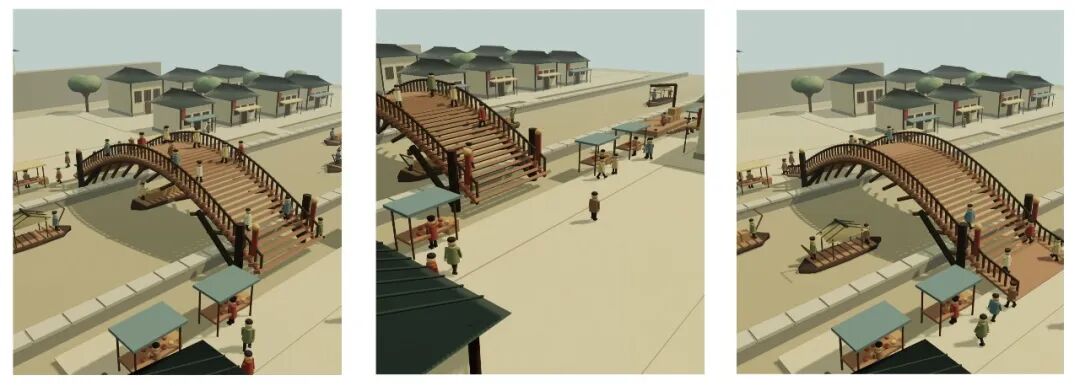
A scene left by the model during its self-inspection.
In the final delivery, porters pick up goods, walk to the dock, and return empty-handed, while customers also stop at stalls. Upon closer inspection, issues remain: pedestrians' bodies clip through shop walls when walking. There are also problems with the river: the water surface is blocked by the ground, making the boat appear to slide on the ground.
The delivery still has issues with pedestrians clipping into shops and the water surface being blocked by the ground.
Finally, I had Kimi create an offline video editor. The timeline, preview, and export must use the same editing results, and refreshing the webpage should retain the recent modifications.
Real-time Prompt (Excerpt): Each video clip can be precisely trimmed with defined start and end points. The system supports clip splitting, deletion, reordering, and the ability to undo or redo edits at the current playback position.... It allows exporting videos in WebM format for immediate playback, ensuring real-time exports. The exported file must accurately reflect the edited and rearranged content, rather than simply downloading the original video under the guise of an export.... The project state is saved locally, enabling the restoration of imported materials and editing results after refreshing or reopening the page.
Edited clips can be rearranged and compiled into a final video output.
We imported footage of a runner and a pelican, assigned segments to each, and rearranged them so the runner appeared first, followed by the pelican. Upon reviewing the exported video, the sequence and segments matched perfectly. Refreshing the webpage successfully restored both the materials and the edited timeline. Functions like splitting, deleting, undoing, and redoing all operated smoothly in this test, making this preliminary version adequate for basic editing tasks.
A minor issue was observed with the exported file: in the Microsoft Edge browser used for testing, the total video duration was not immediately visible upon opening the file. It only became apparent after playback commenced. While the video content itself was accurate, the file metadata was not fully processed.
In this round of testing, functionalities related to physics simulation, audio analysis, and basic video editing have already demonstrated practical applications. Several visual tasks also yielded initial drafts that are open for further refinement, with particular attention needed on spatial relationships and transition effects.
Kimi designates the Pro model as the inaugural offering in the K3.1 series, with no Flash or Ultra variants announced yet. Should a Flash version be introduced in the future, my primary interest lies in its potential to reduce the costs associated with frequent API calls.
Operating multiple agents concurrently results in a higher volume of model calls. If the Flash version can efficiently handle simpler tasks at a reduced cost and increased speed, developers could delegate more complex challenges to the Pro model.
Previous reports indicated that Moonshot AI has commenced recruiting talent in the field of embodied intelligence, with some robotics company employees receiving recruitment calls from Kimi. These reports also included insights from interviewees who suggested internal hesitations regarding the pursuit of an Agentic Robotics path.
Google has already explored applying a Flash-like approach to robotics, developing Gemini Robotics ER 2 based on Gemini 3.5 Flash through specialized embodied reasoning training. This model is tasked with environmental observation, task planning, and monitoring, subsequently invoking lower-level action models for execution.
Given the demonstration of human-like walking capabilities and the recruitment drive for embodied intelligence experts, it's challenging to believe that Kimi is not keen on further exploration in this domain.
The embodied approach I currently favor most involves integrating advanced models into the design and refinement of training processes, enabling control strategies to learn actions through simulation. In practical scenarios, a rapid model would observe the environment and plan tasks, which would then be executed by lower-level control models. While training can involve iterative trials, robots must exhibit swift responsiveness in dynamic environments. Should Kimi develop a low-latency, cost-effective multimodal Flash model in the future, it could serve as an ideal tool for observation and planning tasks.
Regarding the Ultra model, I anticipate enhancements in complex reasoning and long-duration task capabilities. The Pro model still exhibits limitations in problem-solving scenarios that require tool utilization.
Although this test did not 'leave everyone in awe,' it nonetheless underscores Kimi's consistent progress towards real-world physical interaction and overall capability enhancement, particularly given that these advancements are built upon the solid foundation of the K3 architecture.
Kimi has already submitted its findings. Now, for the open-source community, all eyes are on Qwen4.
-
![]()
Alibaba Cloud and Volcano Engine Compete in Automotive Cloud Market
-
![]()
“After Testing K3.1 Pro Overnight, It Seems Kimi Is Truly Advancing Towards Embodied AI”, “K3.1 Pro, Speed, Task Execution, Allowance, Embodied AI”
-
![]()
BYD Registers Decline in Six Models, Xiaomi Undergoes Leadership Shuffle! Comprehensive Review of BEV Sales Rankings from January to September
-
![]()
DeepSeek’s Product Department Entrusted to a Quantitative Trader
-
![]()
After Two Decades of Anticipation, Wuhan and YMTC Face a Cooling A-Share Market
-
![]()
Why Are Automakers Pivoting to Battery Swapping Amid Rapid Advances in Ultra-Fast Charging?
-
![]()
From Lucent to NVIDIA: When History Echoes
-
![]()
Thermal Effects on Femtosecond Filamentation and Supercontinuum Generation in YAG Crystals: Insights from Ultrafast Nonlinear Optics Study No. 105